This PowerShell script retrieves Azure Automation jobs from the last 7 days for a specific runbook, enriches each job with missing details, normalizes all parameters, and exports everything to a CSV file for easy analysis. This can be incredibly useful for operational monitoring, auditing, and troubleshooting. In many environments, runbooks are triggered with dynamic inputContinue reading “Retrieve and Export Azure Automation Jobs with All Parameters”
Author Archives: ahmeduzejnovic
Input Parameters and Validation in PowerShell
When writing or re-organizing PowerShell scripts, one of the first improvements I usually make is replacing hardcoded values with input parameters. At the beginning of my PowerShell journey I often wrote scripts where usernames, server names, or paths were directly written into the script itself. This works for quick tests, but very quickly those scriptsContinue reading “Input Parameters and Validation in PowerShell”
Why $ErrorActionPreference Is Important in PowerShell
Error handling is an important when writing scripts. Many automation scripts interact with external systems such as Active Directory, Azure services, databases, or REST APIs. When something goes wrong, the script should detect the error and react accordingly. PowerShell provides structured error handling through Try, Catch, and Finally blocks. However, there is an important detailContinue reading “Why $ErrorActionPreference Is Important in PowerShell”
Hashtable vs PSCustomObject in PowerShell
PowerShell frequently works with structured data, and two common ways to store such data are Hashtables and PSCustomObjects. While both structures can look similar at first, they behave differently and serve different purposes. Understanding the differences between these two approaches helps create scripts that are easier to read, easier to maintain, and better suited forContinue reading “Hashtable vs PSCustomObject in PowerShell”
How to Measure Script Runtime in PowerShell
This is a short Blogpost, but very useful. When writing scripts, it is often important to understand how long a script or command takes to execute. Measuring script runtime can help identify slow operations, analyze performance, and improve automation processes. In many environments scripts run regularly, for example in scheduled tasks, background jobs, or AzureContinue reading “How to Measure Script Runtime in PowerShell”
Why JSON Is So Powerful in PowerShell
JSON has become one of the most important data formats in modern automation. When you are working with REST APIs, configuration files, or cloud services like Azure and Microsoft Graph, JSON appears everywhere. Fortunately, PowerShell has excellent built-in support for working with JSON, making it easy to convert between structured PowerShell objects and JSON data.Continue reading “Why JSON Is So Powerful in PowerShell”
Start-AzAutomationRunbook -Wait Is Not Enough

When working with Azure Automation Runbooks, it is quite common that one runbook needs to trigger another runbook and wait for the result before continuing the process. The cmdlet Start-AzAutomationRunbook provides the parameter -Wait, which at first glance seems to solve exactly this problem. The command waits until the child runbook finishes. However, there isContinue reading “Start-AzAutomationRunbook -Wait Is Not Enough”
Why Set-ADUser Sometimes Fails Right After User Creation

When working with PowerShell in Active Directory, most scripts look simple at first. You create a user, you update some attributes, you add group memberships, and you move on. In reality, things are not always that clean, especially in environments with multiple Domain Controllers. I ran into a situation that looked strange at the beginning.Continue reading “Why Set-ADUser Sometimes Fails Right After User Creation”
Get All Direct and Indirect Reports from Active Directory
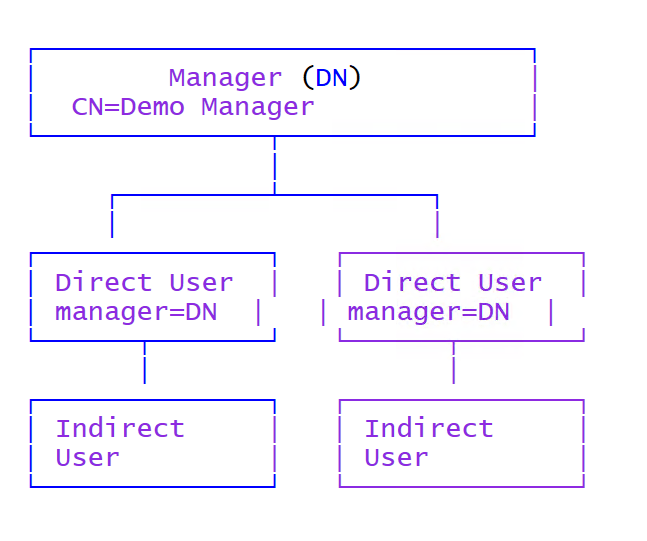
This PowerShell snippet retrieves all Active Directory users that report to a specific manager, including all indirect reports, meaning the whole org tree below that manager. This is useful for scenarios like access reviews, license cleanup, delegations, offboarding, team reporting, and automation workflows where actions must apply to an entire reporting line and not onlyContinue reading “Get All Direct and Indirect Reports from Active Directory”
Trigger Azure Automation Runbook with Cloned Parameters
This PowerShell script demonstrates how to re-trigger an Azure Automation runbook using the exact parameters of a previous job, while still allowing you to override individual values before starting the new run. This approach is extremely useful , especially when a runbook failed due to temporary issues or incorrect input. Instead of manually reconstructing allContinue reading “Trigger Azure Automation Runbook with Cloned Parameters”
 Powershell Works