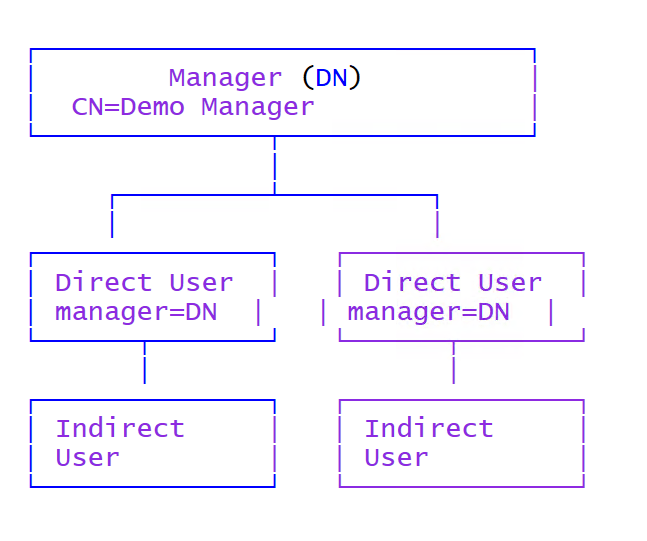
This PowerShell snippet retrieves all Active Directory users that report to a specific manager, including all indirect reports, meaning the whole org tree below that manager.
This is useful for scenarios like access reviews, license cleanup, delegations, offboarding, team reporting, and automation workflows where actions must apply to an entire reporting line and not only the direct reports. In many environments, the manager attribute is already maintained properly, so this becomes a fast and reliable way to build dynamic “team scopes”.
Why this works
The magic is the LDAP matching rule 1.2.840.113556.1.4.1941, also known as LDAP_MATCHING_RULE_IN_CHAIN. It allows searching through a hierarchy recursively. When used with the manager attribute, Active Directory can walk down the chain and return all users that are directly or indirectly assigned to the manager you specify.
Script
Replace the distinguishedName of the manager and run the query. The output returns all users below the manager including direct and indirect reports.
$myDN = "CN=Demo Manager,OU=Users,DC=contoso,DC=local"

$allusersunderamanager = Get-ADUser `
    -LDAPFilter "(manager:1.2.840.113556.1.4.1941:=$myDN)" `
    -Properties manager, displayName, samAccountName

$allusersunderamanager | Select-Object displayName, samAccountName, manager
What is the painful alternative approach
Without LDAP_MATCHING_RULE_IN_CHAIN, the common approach is to query direct reports, then loop through each user, find their direct reports, and repeat until there are no more users. This means recursion, queue handling, and usually extra safeguards to avoid endless loops or duplicate users.
That approach is slower, more complex, harder to maintain, and generates many more LDAP calls, especially in larger organizations with deep org structures.
# Painful approach (recursive looping)
$rootManagerDn = "CN=Demo Manager,OU=Users,DC=contoso,DC=local"

$queue   = [System.Collections.Generic.Queue[string]]::new()
$seen    = [System.Collections.Generic.HashSet[string]]::new()
$result  = New-Object System.Collections.Generic.List[object]

$queue.Enqueue($rootManagerDn)

while ($queue.Count -gt 0) {
    $managerDn = $queue.Dequeue()

    $directReports = Get-ADUser -LDAPFilter "(manager=$managerDn)" -Properties manager, displayName, samAccountName

    foreach ($u in $directReports) {
        if ($seen.Add($u.DistinguishedName)) {
            $result.Add($u)
            $queue.Enqueue($u.DistinguishedName)
        }
    }
}

$result | Select-Object displayName, samAccountName, manager
Result
With the in-chain matching rule, you get:
- One query instead of many
- Recursive results automatically handled by AD
- Cleaner code and fewer moving parts
- Much better performance in large org structures
Use cases
- Remove group memberships or licenses for a full team
- Run compliance checks for everyone under one manager
- Create dynamic scopes for automation (e.g., onboarding, offboarding)
- Generate org reports quickly without exporting org charts
Happy automating! 🚀

