As automation heros we are often confronteed with tasks like automating stuff in exchange online.
One task we had was not very difficult but also not that straight forward. We are speaking from sending mails over the Graph API.

There are multiple aproaches to do it. For sure you can do it wrong and you can do it right. We will do it the right way.
The Stuff we need :
-PowerShell Console with a Connection to our Exchange Online Environment
–APP REGISTRATION
–A Script Sending Mails using our Application
We will use RBAC to assign the Application Mail.Send Permission to our Application. After we have assigned the permission we need to restrict the access of this application to be only able to send from a specific Mailbox and not from all Mailboxes.
First create or use an existing App Registration.
To Create an App Registration use the link -> APP REGISTRATION

Now we need the Application ID & Object ID from the Enterprise App.
Don't use it from the App registration !

#1 Connect to Exchange Online

Connect-ExchangeOnline

#2 Create new ServicePrincipal

$APPID= "<APPLICATION ID>"
$ObjectID = "<OBJECT ID>"

#Choose an DisplayName for the SP

$SPDisplayName = "SP_EXO_SEND_MAIL"

#create your ServicePrincipal

New-ServicePrincipal -AppId $APPID -ObjectId $Objectid -DisplayName "SP_EXO_SEND_MAIL"

#Get Service Principal

Get-ServicePrincipal -Identity $Objectid
Now we have created our ServicePrincipal.
It is time to give him some permissions.
But first we need to find out how our Permission is called.
Use the Microsoft Documentation for this here : Supported App Roles

We need the Role : "Application Mail.Send"
$Roleassignment = New-ManagementRoleAssignment -App $Clientid -Role "Application Mail.Send"

$Roleassignment | select name,role,RoleAssignee,RoleAssigneeType,CustomRecipientWriteScope,AssignmentMethod

<#
----------------------------------------------------------------------------------------
Name                      : Application Mail.Send-83737823-e0c2-4693-8e19-85955a180343-1
Role                      : Application Mail.Send
RoleAssignee              : 83737823-e0c2-4693-8e19-85955a180343
RoleAssigneeType          : ServicePrincipal
CustomRecipientWriteScope :
AssignmentMethod          : Direct
-----------------------------------------------------------------------------------------
#>
At this moment, we will be able to send emails from every mailbox. This isn't that good, so we need to restrict the Application.
We need to create a Application Access Policy and assign it to our APP.

We need to create a Mail Enabled Security Group.

Only the Members of the Group will be able to send Mails from our Application
#https://learn.microsoft.com/en-us/graph/auth-limit-mailbox-access


$APPID= "68a677994-ass2-24h4-abc1-a5h35ea1e33c"
$GroupMailaddress = "GRP_LIMIT_ACCESS_APP_EXO_SEND_MAIL@contoso.com"

#2 Create a new application access policy for the app to restrict access to the APP with the group

New-ApplicationAccessPolicy -AppId $APPID -PolicyScopeGroupId $GroupMailaddress -AccessRight RestrictAccess -Description "Restrict this app to members of group GRP_LIMIT_ACCESS_APP_EXO_SEND_MAIL."


Result after Execution :


ScopeName        : GRP_LIMIT_ACCESS_APP_EXO_SEND_MAIL
ScopeIdentity    : GRP_LIMIT_ACCESS_APP_EXO_SEND_MAIL26242906102555
Identity         : REMOVED
AppId            : 68a677994-ass2-24h4-abc1-a5h35ea1e33c
ScopeIdentityRaw : REMVOED
Description      : Restrict this app to members of group GRP_LIMIT_ACCESS_APP_EXO_SEND_MAIL.
AccessRight      : RestrictAccess
ShardType        : All
IsValid          : True
ObjectState      : Unchanged
We can also test our newly created Policy !

Use the command below.
Test-ApplicationAccessPolicy -Identity policy.test@contoso.com -AppId $APPID
So below i have tested the Policy and it works !

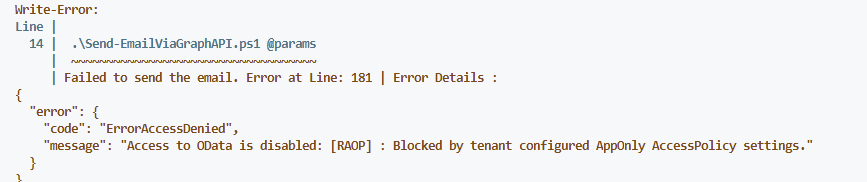
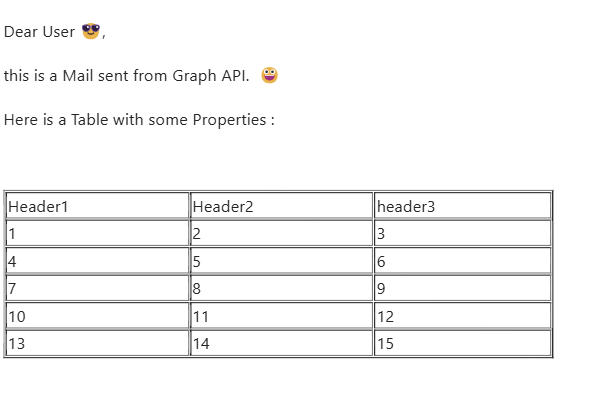
Now you can test the Application. Obtain a token and try to send a Mail from the address you permitted & try to send from a other one.
My Result looks like following

Send from not permitted User account:
Send from permitted User account :
If possible, restrict as much as you can to be on the safe side. In our example, it is only possible to send from email addresses if you are a member of the security group we created. This means that you can no longer send from every address in the company, but only from certain ones.
 Powershell Works